
Postback Tracking Explained: A Practical Guide for Affiliate Networks
Understand how server-to-server postbacks work, which parameters matter, how to test callbacks, and how to diagnose missing conversions.
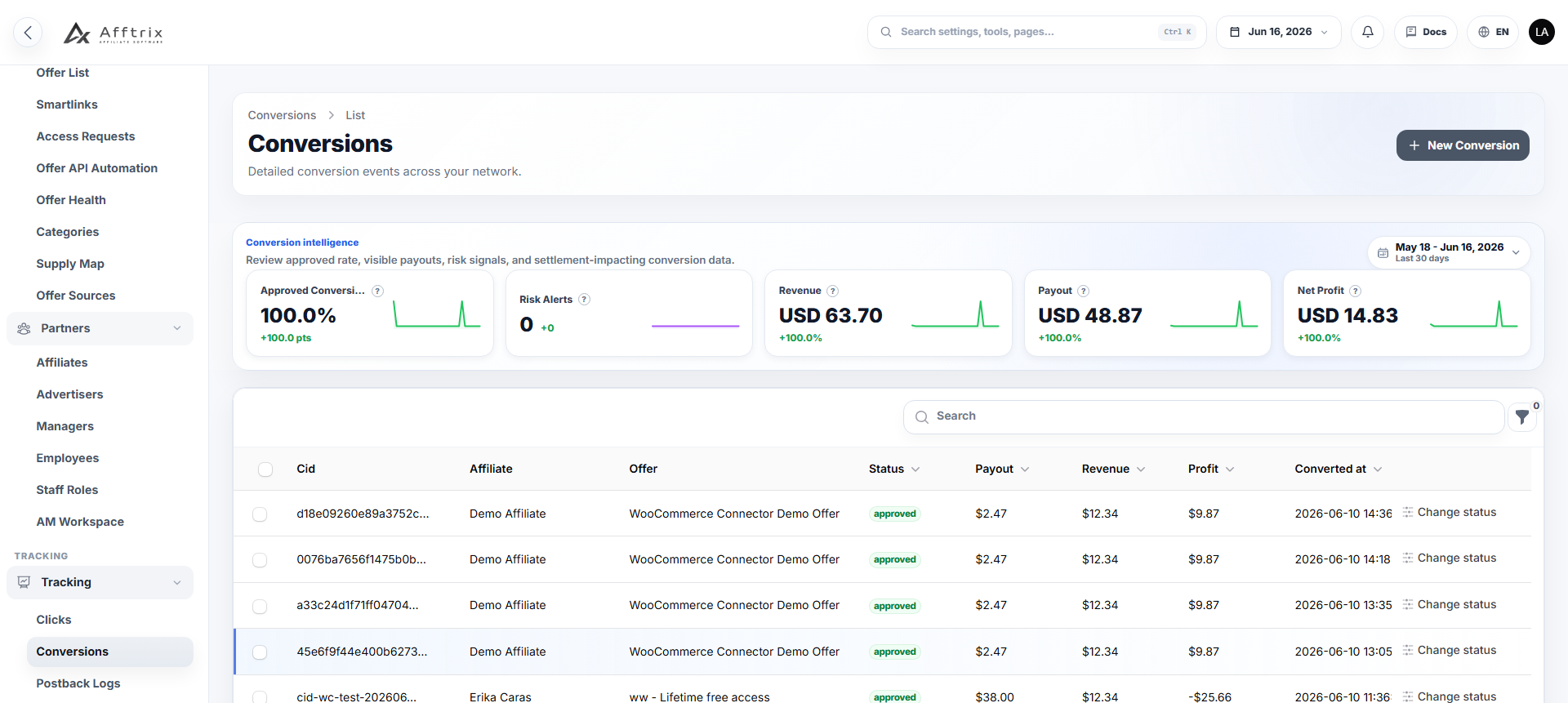
Postback tracking is a server-to-server method for reporting a conversion after an affiliate click. Instead of relying only on a browser pixel, the advertiser or tracking system sends a request directly to a callback URL with the click identifier and conversion details.
For affiliate networks, the central requirement is simple: the identifier created at click time must return with the conversion. Everything else—attribution, revenue, payout, reporting, and partner notification—depends on that link.
How a postback flow works
A typical flow has five stages:
- An affiliate sends a visitor through a network tracking link.
- The network records the click and creates a unique click ID.
- The visitor is redirected to the advertiser while the click ID is passed in a supported parameter.
- The advertiser records a sale, lead, install, or other conversion event.
- The advertiser calls the network postback URL and returns the click ID with event data.
The network uses the click ID to find the original affiliate, offer, campaign context, and attribution data. It can then create the conversion and, when required, notify the affiliate through the affiliate's own postback URL.
The parameters that matter
Parameter names vary between platforms, but the underlying data is usually similar.
Click identifier
This is the most important value. It may be called click_id, cid, subid, or something platform-specific. It must be unique enough to locate the original click and must not be replaced by a session value that disappears before conversion.
Transaction identifier
A transaction or order ID helps prevent duplicates and supports reconciliation. If the same advertiser event is sent twice, the platform can use this ID with other event context to decide whether the second request is a duplicate or a legitimate additional event.
Revenue and payout
Revenue is normally the amount earned from the advertiser. Payout is the amount owed to the affiliate. These values should not be confused, and a platform should record the currency and pricing rule used when the conversion was created.
Status and event type
Not every conversion is immediately approved. Advertisers may send pending, approved, rejected, or reversed states. Subscription and ecommerce flows may also send separate events for trials, purchases, renewals, refunds, or chargebacks.
Additional context
Useful optional fields include product ID, coupon code, country, goal, conversion time, and custom advertiser parameters. Only collect data that your reporting or operating workflow will actually use.
Why browser pixels are not enough
Browser pixels can still be useful, but modern browsers, privacy controls, blocked scripts, cross-domain journeys, and delayed conversions make them less reliable as the only attribution method.
Server-to-server postbacks reduce dependence on the final browser page because the conversion notification comes from the advertiser's server. They do not eliminate every tracking problem: the advertiser must still store the click ID correctly and send an accurate callback.
Build a repeatable testing process
Do not test postbacks only during the initial integration. Create a repeatable procedure that operators and support staff can run.
1. Generate a controlled test click
Use a test affiliate and offer. Add recognizable sub IDs so the click is easy to find. Record the generated click ID and the exact redirect URL received by the advertiser.
2. Send the conversion manually
Use the advertiser's test tool, an API client, or a safe platform simulator to send the callback. Start with required parameters only. Add optional fields after the basic conversion succeeds.
3. Inspect the HTTP response
Record the status code and response body. A 200 OK response usually means the endpoint accepted the request, but it does not automatically prove that attribution, pricing, and duplicate checks behaved correctly.
4. Verify the conversion record
Check the affiliate, offer, click ID, transaction ID, revenue, payout, currency, status, and timestamps. Confirm that reports and balances reflect the expected state.
5. Test the affiliate callback
If the network forwards conversions to an affiliate, inspect the outgoing URL, substituted macros, response, and retry behavior. Never assume the second callback works because the first one did.
Common reasons conversions go missing
The click ID was not stored
The advertiser may receive the click ID but fail to save it with the visitor or order. This often appears when the landing page, checkout, mobile app, or third-party payment page breaks the attribution chain.
Parameter names do not match
One side may send clickid while the other expects click_id. A mapping layer should make these differences explicit rather than relying on memory.
Values are encoded incorrectly
Spaces, ampersands, plus signs, Unicode text, or nested URLs can change meaning if they are not encoded correctly. Inspect the raw request rather than only the formatted interface.
Duplicate protection is too broad
Blocking every repeated click ID can reject legitimate recurring events. Duplicate rules may need to consider transaction ID, goal, event type, or time window.
The callback timed out
Network errors and slow endpoints happen. The system should record the attempt and support controlled retries without creating duplicate conversions.
Status changes are handled as new conversions
An advertiser may update an existing transaction from pending to approved or rejected. The network must distinguish an update from a new event.
What a useful postback log should show
A support-friendly log should connect the raw request with business context. Look for:
- Request time and source
- Full parameter set with sensitive values protected
- Mapped click, offer, affiliate, and advertiser
- Validation or rejection reason
- Created or updated conversion ID
- HTTP response and response body
- Retry history
- Related outgoing affiliate callback
This evidence shortens support conversations because the team can discuss a specific request rather than guessing from aggregate reports.
Security considerations
Postback endpoints can change financial records, so they need protection. Depending on the integration, use secrets, signatures, source restrictions, idempotency rules, validation, and rate limits. Avoid putting credentials or unnecessary personal data into query strings that may appear in logs.
Permissions matter too. A manual retry or conversion adjustment should be limited to authorized staff and recorded in an audit trail.
Operational checklist
Before accepting traffic, confirm that:
- The click ID reaches and is stored by the advertiser
- Required and optional parameters are documented
- Test conversions use the intended pricing and currency
- Duplicate behavior matches the event model
- Status updates change the correct record
- Failed callbacks are visible and retryable
- Affiliate callbacks have their own evidence
- Secrets and sensitive actions are protected
Afftrix includes click, conversion, and postback workflows intended to give operators a connected view of attribution evidence. Explore the tracking and attribution workflow or review the product overview when comparing implementation options.